Dimension Annotation Pro
Quickly Add Professional Dimensions in Photoshop (1-Click Script)
Product Description
📏 Dimension Annotation Pro
Professional Measurement, Spacing & Technical Annotation Tool for Photoshop
😩 Tired of Manual Size Labeling?
Creating technical drawings, product specifications, architectural layouts, furniture diagrams, manufacturing instructions, and design presentations often requires countless manual measurements and annotations.
Drawing dimension lines by hand is slow, repetitive, and prone to mistakes.
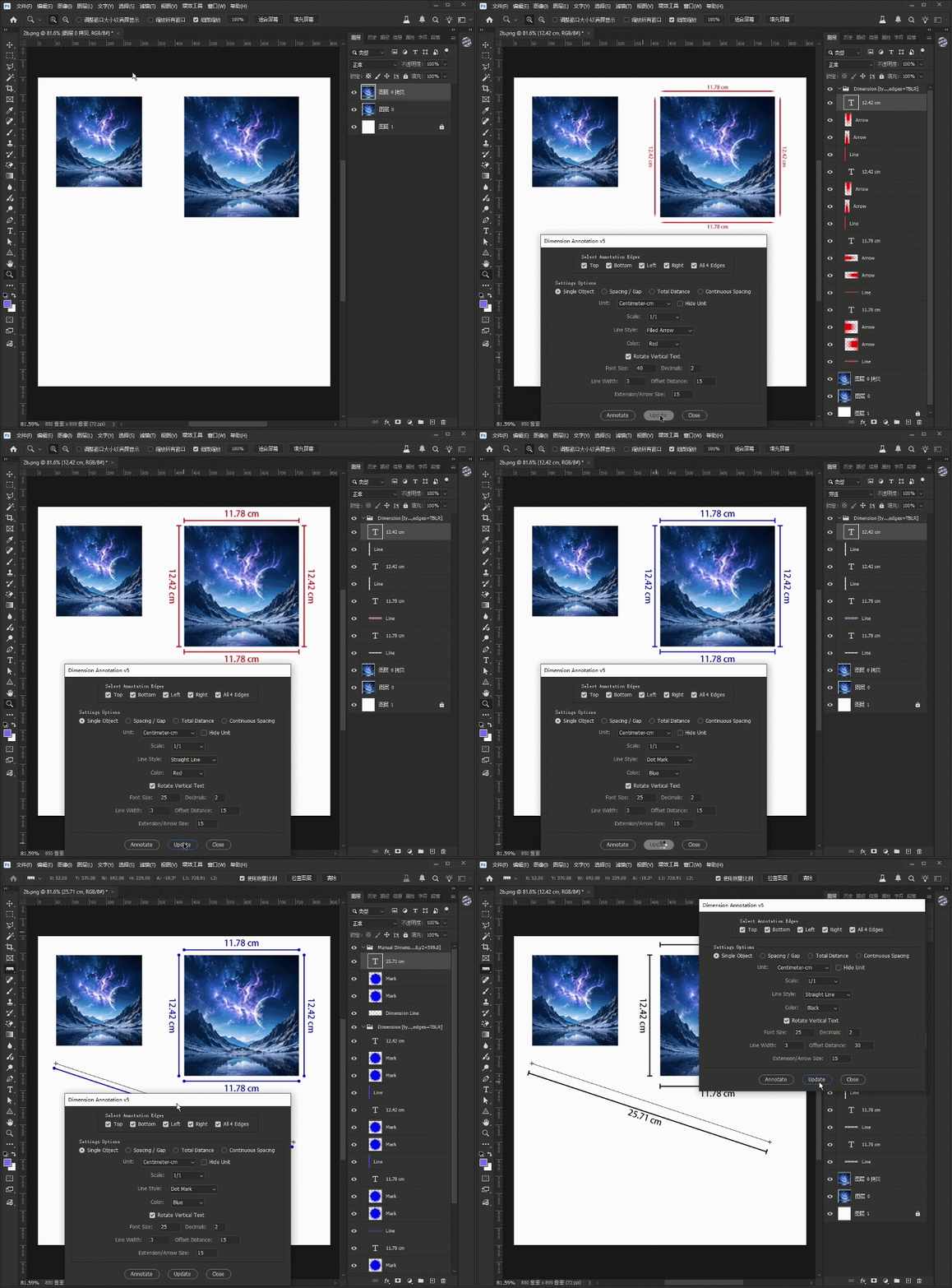
Dimension Annotation Pro automates the entire process directly inside Photoshop.
🚀 Key Features
✅ Automatic Width & Height Annotation
✅ Object Spacing Measurement Between Layers
✅ Continuous Dimension Chain Annotation
✅ Total Distance Measurement Across Multiple Objects
✅ Multiple Dimension Styles
- Filled Arrows
- Slash Marks
- Tick Marks
- Dot Marks
✅ Flexible Units
- mm
- cm
- m
- pt
- px
✅ Adjustable Scale Ratios
- 1:1
- 1:10
- 1:100
✅ Custom Colors, Font Sizes & Stroke Widths
✅ Vertical Text Rotation Support
✅ One-Click Annotation Update System
🎯 Perfect For
- Product Designers
- Packaging Designers
- Architects
- Engineers
- Furniture Designers
- Manufacturing Teams
- Technical Illustrators
- E-commerce Sellers
- Photoshop Power Users
⚡ How To Use
1. Open Your Photoshop File
Load any design, layout, blueprint, mockup, or technical drawing.
2. Select Objects
Choose one or multiple layers, or create a selection area.
3. Choose Annotation Mode
- Single Object Annotation
- Distance Annotation
- Total Dimension Annotation
- Continuous Spacing Annotation
4. Customize Style
Set:
- Units
- Colors
- Font Size
- Line Style
- Scale Ratio
5. Click Annotate
The script instantly generates professional measurement graphics.
💻 Compatibility
- Adobe Photoshop CC
- Adobe Photoshop 2024+
- Windows
- macOS
File Format:
.jsx
No additional plugins required.