Portrait ID Photo Generator
Photoshop Script for automatic ID photo cropping, resizing, background color replacement, and batch export to multiple passport and visa photo formats.
Product Description
📸 AI Portrait ID Photo Generator for Photoshop
🚀 Create Professional Passport & ID Photos in Seconds
Still manually cropping portraits, adjusting head positions, changing background colors, and exporting multiple photo sizes one by one?
Producing passport photos, visa photos, employee IDs, school IDs, and official documents can be incredibly repetitive and time-consuming.
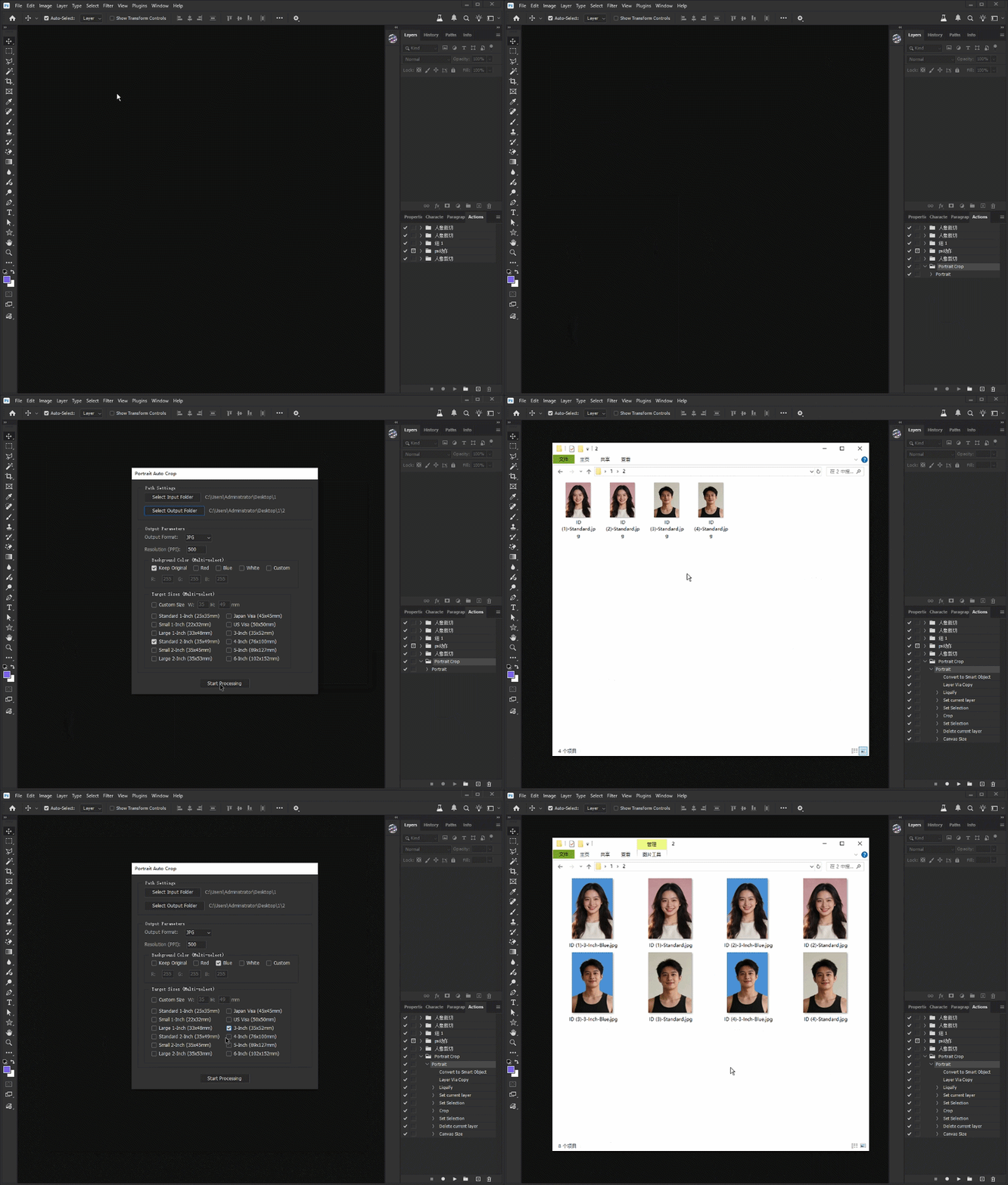
This Photoshop automation script transforms the entire workflow into a fully automated batch process.
Simply load your photos, choose the desired output sizes, and let the script do the rest.
✨ Key Features
🤖 Automatic Portrait Position Detection
Uses a companion Photoshop Action to automatically locate and align portrait subjects before cropping.
📏 Multi-Size ID Photo Generation
Generate multiple passport and ID photo formats simultaneously, including:
-
Passport Photos
-
Visa Photos
-
Japanese Visa Photos
-
US Visa Photos
-
1 Inch Photos
-
2 Inch Photos
-
Custom Sizes
🎨 Automatic Background Replacement
Batch export multiple versions with:
-
Red Background
-
Blue Background
-
White Background
-
Custom Background Colors
-
Original Background
⚡ High-Speed Batch Processing
Process entire folders of portraits automatically without opening and editing each image manually.
🧠 Smart Canvas Expansion
Automatically fills extended canvas areas to eliminate empty borders and improve composition.
👥 Perfect For
-
Passport Photo Studios
-
Visa Processing Agencies
-
Freelance Designers
-
Photography Businesses
-
E-commerce Service Providers
-
HR Departments
-
School Administration Teams
-
Government Document Service Providers
📖 How To Use
Step 1
Load the included Photoshop Action (.ATN) into the Actions Panel.
How to Load Actions [REQUIRED]
--------------------------------------------------
Please choose one of the following two methods to load the action into Photoshop:
Method 1: Drag & Drop
- Drag the file "Portrait Crop.ATN" and drop it directly into your Photoshop "Actions" panel.
Method 2: Manual Load
1. Open the "Actions" panel in Photoshop (Window > Actions).
2. Click the menu icon (top-right corner of the Actions panel).
3. Select "Load Actions..." from the dropdown menu.
4. Locate and select the "Portrait Crop.ATN" file, then click "Load".
Step 2
Launch the script inside Photoshop.
Step 3
Select an input folder containing portrait photos.
Step 4
Choose output sizes, resolution, and background options.
Step 5
Click "Start Processing".
Step 6
The script will automatically:
-
Detect portrait positioning
-
Crop and align subjects
-
Generate multiple ID photo sizes
-
Replace backgrounds
-
Export final images
💻 Compatibility
✔ Adobe Photoshop
✔ Windows
✔ macOS
✔ JSX Script Format
✔ Beginner Friendly
✔ No Coding Required
📦 Included Files
-
Photoshop JSX Script
-
Photoshop Action File (.ATN)
-
Installation Guide
Save hours of repetitive editing work and generate professional ID photos with a single click.
Why This Tool Is Different
Most ID photo tools only resize images.
This solution combines a Photoshop Action and an automation script to create a complete portrait processing workflow.
The included Action handles portrait positioning and subject alignment, while the script manages batch processing, background replacement, multi-size generation, and file export.
The result is a fast, scalable system for producing professional passport and ID photos with minimal manual work.
GIF Demonstration