LayerSplit
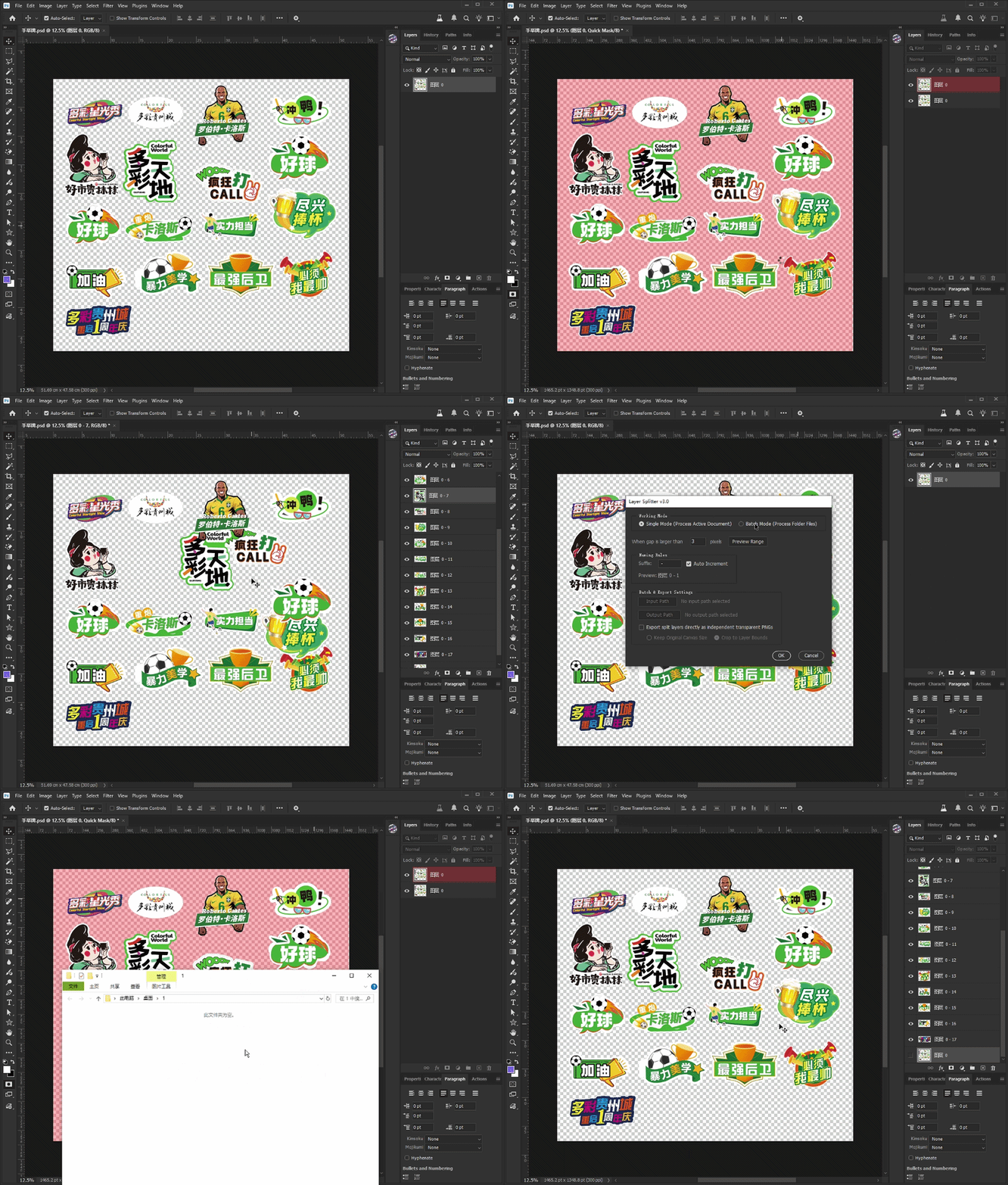
LayerSplit Pro is a Photoshop Script that automatically separates disconnected objects into individual layers and exports transparent PNG assets in batch.
Product Description
🚀 Instantly Split Connected Objects into Separate Layers
Ever received a complex artwork, sticker sheet, icon set, sprite sheet, or product layout where dozens of objects are trapped inside a single layer?
Manually selecting, copying, masking, and organizing every object can take hours.
LayerSplit Pro automatically detects disconnected regions inside a layer and converts them into individual editable layers in seconds.
Perfect for designers, illustrators, print studios, sticker creators, game asset developers, and eCommerce production teams.
✨ Key Features
🎯 Automatic Object Detection
Detects isolated graphic regions within a layer and separates them automatically.
⚡ One-Click Layer Generation
Creates individual layers for every detected object without manual selections.
📦 Batch Processing Support
Process entire folders of PSD, PNG, JPG, TIFF, and other supported image formats automatically.
🖼 Export Transparent PNG Files
Automatically export each separated object as an independent transparent PNG.
✂ Optional Auto Crop
Export objects at original canvas size or crop tightly to object boundaries.
🔢 Smart Naming System
Automatic numbering and customizable naming suffixes for organized workflows.
🧠 Gap Tolerance Control
Adjust separation sensitivity to merge or split nearby elements based on pixel distance.
👨🎨 Perfect For
-
Graphic Designers
-
Print Production Teams
-
Sticker Creators
-
Packaging Designers
-
Illustrators
-
UI Asset Designers
-
Game Developers
-
Sprite Sheet Creators
-
eCommerce Image Editors
-
POD (Print-On-Demand) Sellers
📖 How To Use
Single Document Mode
-
Open your image in Photoshop
-
Select the target layer
-
Run the script
-
Adjust separation settings
-
Click OK
-
Receive automatically generated individual layers
Batch Mode
-
Select an input folder
-
Select an output folder
-
Enable PNG export if needed
-
Run batch processing
-
Let the script process all supported files automatically
💡 Typical Use Cases
✅ Sticker Sheet Separation
✅ Icon Pack Extraction
✅ Character Sprite Splitting
✅ Product Element Extraction
✅ Laser Cutting Artwork Preparation
✅ Print Production Workflow
✅ Marketplace Asset Packaging
✅ Bulk Graphic Organization
🖥 Compatibility
-
Adobe Photoshop CC 2018+
-
Adobe Photoshop 2020
-
Adobe Photoshop 2021
-
Adobe Photoshop 2022
-
Adobe Photoshop 2023
-
Adobe Photoshop 2024
-
Adobe Photoshop 2025
Supported Formats:
-
PSD
-
PNG
-
JPG / JPEG
-
TIFF / TIF
Operating Systems:
-
Windows
-
macOS
🎁 Save Hours of Manual Layer Separation
Stop selecting objects one by one.
Let LayerSplit Pro automatically convert complex artwork into clean, organized, production-ready layers with a single click.
GIF Demonstration