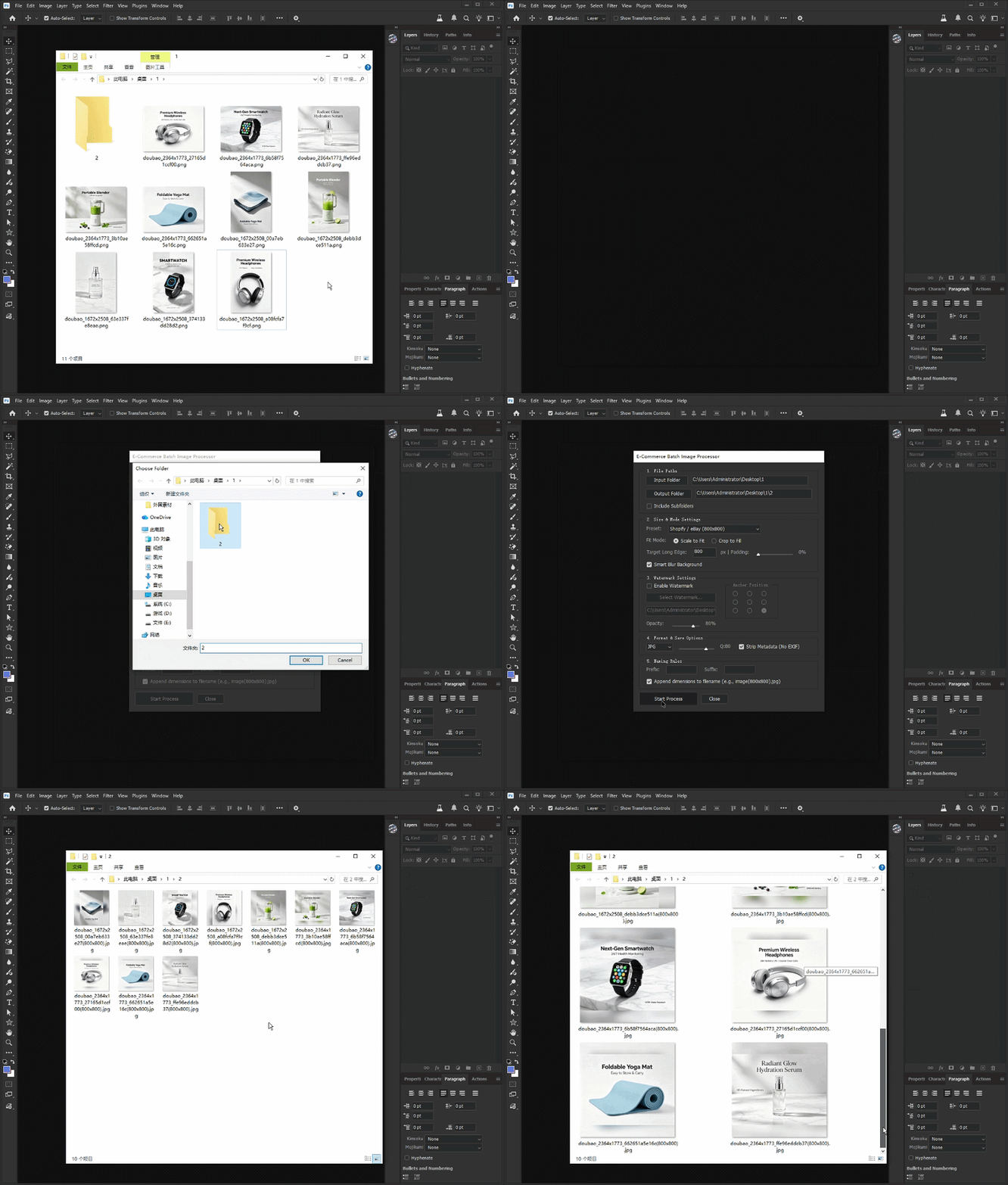
Ecom Image Batch Master
Ecom Image Batch Master is a Photoshop Script for batch resizing, watermarking, formatting, and optimizing e-commerce product images for Shopify, Amazon, eBay, and TikTok Shop.
Product Description
🚀 Ecom Image Batch Master – Photoshop JSX Script
🎯 Transform Hundreds of Product Images in Minutes
Still resizing, cropping, adding watermarks, and exporting product photos one by one?
Managing ecommerce images for Amazon, Shopify, Etsy, TikTok Shop, Taobao, or WooCommerce can become a repetitive and time-consuming task. This Photoshop automation script eliminates manual processing and helps you create consistent, professional-looking product images with just a few clicks.
⚡ Core Features
🖼 Smart Batch Image Processing
Process entire folders of images automatically, including nested subfolders.
📏 Multi-Platform Presets
Built-in presets for:
-
Amazon
-
TikTok Shop
-
Taobao
-
JD
-
Pinduoduo
-
Custom Sizes
🎨 Fit & Fill Modes
Choose between:
-
Fit with white margins
-
Fill with intelligent crop
Perfect for different marketplace requirements.
🌫 Smart Blur Background
Automatically create clean blurred backgrounds for non-square product photos.
💧 Advanced Watermark System
Add logo watermarks with:
-
9-position anchor placement
-
Adjustable transparency
-
Batch application
📦 Multi-Format Export
Export directly to:
-
JPG
-
PNG
-
WebP
With customizable quality settings and optional metadata removal.
🏷 Flexible File Naming
Automatically add:
-
Prefixes
-
Suffixes
-
Image dimensions
for better asset management.
👨💻 Perfect For
-
Ecommerce Sellers
-
Amazon FBA Businesses
-
Shopify Store Owners
-
Etsy Sellers
-
TikTok Shop Merchants
-
Product Photographers
-
Marketing Agencies
-
Graphic Designers
📚 How To Use
Step 1
Open Photoshop and run the JSX script.
Step 2
Select your source image folder.
Step 3
Choose an output folder.
Step 4
Select a platform preset or define custom dimensions.
Step 5
Configure:
-
Fit / Fill Mode
-
Watermark Settings
-
Export Format
-
Naming Rules
Step 6
Click Start Processing and let the script handle everything automatically.
✅ Compatibility
-
Adobe Photoshop CC
-
Adobe Photoshop 2021+
-
Adobe Photoshop 2022+
-
Adobe Photoshop 2023+
-
Adobe Photoshop 2024+
-
Adobe Photoshop 2025+
Operating Systems
-
Windows
-
macOS
Supported Input Formats
-
JPG
-
JPEG
-
PNG
-
PSD
-
TIFF
-
BMP
-
GIF
-
WebP
-
PDF
-
AI
-
EPS
Output Formats
-
JPG
-
PNG
-
WebP
GIF Demonstration